Deep Dive into Function Calling, MCP, and Skills: Essential Differences and Best Practices 
About This Series 
As the author of Lynxe (formerly JManus), I've spent considerable spare time refining this Func-Agent framework, which has deepened my understanding of what ReAct-based Agents truly are.
I want to share these insights because the core purpose of this project is to explore cutting-edge best practices for Agents. We've made significant progress—Lynxe can now solve over 80% of the problems I face—so I believe it's worth documenting the effective approaches I've discovered through experimentation, making it easier for others to get started quickly.
You can visit Lynxe (菱科斯) to read the detailed source code and learn about agent best practices. This is a very comprehensive, production-ready Func-Agent framework.
Series Plan 
- What is a ReAct Agent?
- How do Agents differ fundamentally from traditional workflows?
- Deep Dive into Function Calling, MCP, and Skills: Essential Differences and Best Practices
- Context Management Practices
- Best Practices for Parallel Execution and Lessons Learned
- Additional topics based on feedback and ideas
Introduction 
In previous articles, we introduced what ReAct Agents are and the fundamental differences between Agents and traditional programming/workflows.
Now let's discuss a widely talked-about topic: What are AI Agent tool capabilities? What are the differences between Function Calling, MCP, and Skills? What are the core principles behind them?
One-Sentence Summary 
Function Calling: The foundational capability for AI Agents to invoke tools, and the prerequisite for the other two to exist.
MCP (Model Context Protocol): An open standard promoted by Anthropic that provides standardized interfaces for LLM applications to connect and interact with external data sources and tools. It has been donated to the Linux Foundation.
Skills: A new initiative by Claude that allows users to define instructions, scripts, and resources in text with greater detail. It has a competitive-cooperative relationship with MCP, which we'll elaborate on from different angles later (though many consider them complementary, they are actually more competitive than complementary).
Why These Technologies Are Needed: Understanding the Foundation of Tool Invocation 
To explain why these concepts have a competitive-cooperative relationship, we need to first briefly understand the basic principles of AI Agent tool invocation.
Basic Flow of AI Agent Tool Invocation 
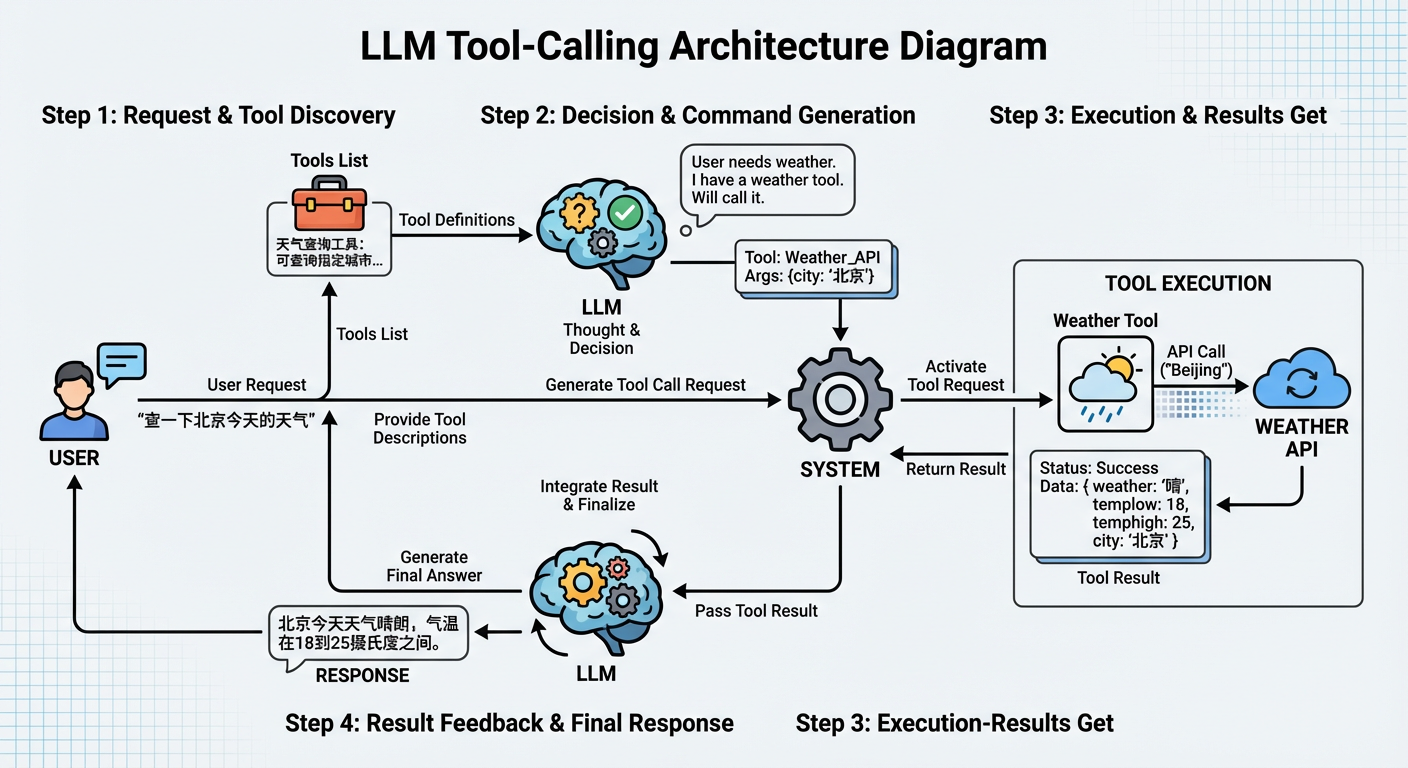
A typical AI Agent tool invocation flow works like this:
LLM Receives User Request and Tool Descriptions
- User makes a request (e.g., "Check today's weather in Beijing")
- System provides the LLM with a list of available tools and descriptions (e.g., "Weather query tool: can query weather information for specified cities")
LLM Decides Whether to Invoke Tools
- LLM judges whether tool invocation is needed based on user requirements and tool descriptions
- If needed, LLM generates structured tool invocation requests
The key here is that the LLM returns structured JSON format, not natural language. For example, when the user says "Check today's weather in Beijing," the LLM might return:
json{ "id": "chatcmpl-abc123", "object": "chat.completion", "choices": [ { "index": 0, "message": { "role": "assistant", "content": null, "tool_calls": [ { "id": "call_abc123", "type": "function", "function": { "name": "get_weather", "arguments": "{\"city\": \"Beijing\", \"date\": \"today\"}" } } ] }, "finish_reason": "tool_calls" } ] }This structured output format is the core mechanism of Function Calling. It enables the system to reliably parse the LLM's intent without complex text parsing logic. Key fields to note:
tool_calls: Contains tool invocation information when tools need to be calledfunction.name: The name of the tool to invokefunction.arguments: Tool parameters (in JSON string format)
System Parses and Executes Tool Invocation
- System parses the tool invocation request generated by the LLM
- Executes the corresponding tool function (e.g., calling the weather API)
- Obtains tool execution results
Using the LLM response above as an example:
The JSON format above is parsed by the system and converted into actual function calls. In JavaScript:
javascript// 1. Extract tool invocation information from LLM response const toolCall = response.choices[0].message.tool_calls[0]; const functionName = toolCall.function.name; // "get_weather" const functionArgs = JSON.parse(toolCall.function.arguments); // {city: "Beijing", date: "today"} // 2. Find corresponding function based on tool name const tools = { get_weather: (city, date) => { // Execute weather query logic return `Beijing today's weather: 25°C, sunny`; }, // ... other tools }; // 3. Execute tool invocation const result = tools[functionName](functionArgs.city, functionArgs.date); // Actual call: tools["get_weather"]("Beijing", "today")This process is automatic: the system finds the corresponding function based on
function.name, parsesfunction.argumentsto get parameters, then executes the call. This is the core mechanism that makes Function Calling predictable and reliable for tool invocation.Return Results to LLM
- Tool execution results are returned to the LLM
- LLM decides next steps based on results (continue calling tools, or generate final answer)
Summary: The Essence of Tool Invocation 
The core of this flow is: the LLM needs to convert unstructured user requirements (natural language text) into structured function calls (function names and parameters), then interact with other applications, and return structured results to the model, enabling the model to make next-step decisions based on these results.
The essence of the problem is that historically, other systems (databases, APIs, file systems, etc.) could only process structured information, while LLMs excel at processing unstructured information (text). Therefore, LLMs must bridge these two information forms: converting unstructured user requirements into structured function calls to interact with external systems.
This is the essence of Function Calling, and also the prerequisite for MCP and Skills to exist.
Why Do MCP and Skills Exist When We Already Have Tool Invocation? 
Function Calling indeed solves the core problem: enabling LLMs to reliably output structured tool invocation requests, achieving the "unstructured → structured" conversion. This is the foundation of AI Agent tool capabilities.
However, in practical applications, developers quickly discovered a new problem: tool integration costs are too high.
Function Calling Has High Tool Integration Costs 
In the real world, there are numerous existing systems and data: databases storing business data, file systems with various documents and code, GitHub with project repositories and issues, DingTalk with team communication records, and various API services providing real-time data. These existing systems contain rich information. If LLMs could directly use these systems and data, AI Agent capabilities would be greatly enhanced.
But the question is: How can we enable LLMs to use these existing systems?
Under the Function Calling framework, each existing system needs to be individually integrated into the application. Each organization or company has its own APIs, authentication methods, and data formats. Developers need to write corresponding function implementations for each organization or company. This is why MCP emerged: to provide a service that allows existing systems to be quickly integrated into LLMs.
MCP's core is still based on Function Calling. What it does is simple: convert Function Calling invocations into JSON+HTTP requests on the client side. Then provide a Server to respond to these JSON+HTTP requests, achieving the effect that various applications can be used by LLMs.
LLM -> Function Calling -> MCP Client -> JSON+HTTP Request -> MCP Server -> Existing Systems (GitHub/Slack/Databases, etc.)
                                                                        ↓
LLM <- Function Calling Result <- MCP Client <- JSON Response <- MCP Server <- Existing System Returns ResultsBut after MCP solved the tool integration problem, another issue emerged.
Function Calling and MCP Both Have Task Flow Definition Difficulties 
In practical use, users often need AI Agents to execute tasks in specific ways. For example, formatting Excel spreadsheets according to company brand guidelines, legal reviews following specific compliance requirements, data analysis according to organizational workflows. These tasks often require complex prompts and combinations of multiple steps.
But under the Function Calling and MCP framework, users face a dilemma: current large models struggle to make optimal tool invocation steps relying solely on their own model capabilities. Many tasks require specific execution orders, rules, and constraints, but writing all these steps into code isn't practical. As we mentioned in the first article, the model's core advantage is being able to take things step by step and dynamically adjust strategies when facing uncertainty. If everything becomes code, we lose the model's core advantage.
For example, let's take a new_branch flow definition that Lynxe actually runs. I write this flow in text in a markdown file, and have the model follow it every time:
1) Confirm that local VERSION matches pom.xml and local branch versions. If inconsistent, use pom.xml as reference
2) mvn package
3) Enter ui-vue3 and run pnpm lint
4) Return to project directory, git merge upstream/main
5) In project directory, run make ui-deploy
6) Git commit branch to origin
7) Git package tag name matches pom version number. First delete remote tag (if exists): git push upstream :refs/tags/v{version}, then upload tag to upstream (before uploading, check upstream with git remote to confirm it's spring-ai-alibaba/JManus)This flow has 7 steps, each with specific order, conditions, and rules. If written entirely in code, each step would need to handle various exception cases (version mismatches, existing tags, incorrect upstream addresses, etc.), making the code very complex. But if we only give the model a simple prompt like "help me create a new branch," the model might not execute according to this precise flow, or execute in the wrong order.
Expressing it in text is very direct and simple, and in actual runs, there's only a very small probability of errors—very satisfying.
This is the essence of the problem: How can users guide the model to execute tasks according to specific flows and rules using text (rather than code), while maintaining as much accuracy as possible?
This is why Skills emerged (and also the core reason why Lynxe's Func-Agent emerged): to provide a way for users to define instructions, scripts, and resources in text, forming reusable task flows.
Skills' core is also based on Function Calling. What it does is clever: through a fixed function and parameters, have the model find and load fixed skill documents.
The key here is that Skills completely depends on Function Calling as a foundational capability. Without Function Calling, Skills cannot work. Skills is just a clever application built on top of Function Calling: encapsulating the "load document" operation as a function, then having Claude automatically invoke it when needed.
The specific workflow is:
Initialization Phase: Users define instructions, scripts, and resources in text, packaged into Skills (containing SKILL.md and optional scripts, reference materials, etc.). When Claude starts, it reads metadata (name and description) of all Skills, which are loaded into the model's context (about 100 tokens each).
Discovery Phase: When a user makes a request, Claude compares the request content with loaded Skill metadata to determine if a Skill is needed. This judgment process is essentially the LLM making decisions based on context, same as judging whether to invoke tools in Function Calling.
Loading Phase (Function Calling): If Claude determines a Skill is needed, it uses Function Calling mechanism to invoke a specialized loading function (like
load_skill(skill_name)), reading and loading the corresponding SKILL.md document content into the current context. This step completely depends on Function Calling capability.Execution Phase (Continuing to Use Function Calling): After SKILL.md content (containing instructions, flows, examples, etc.) is added to the context, Claude executes tasks according to instructions defined in the document. If SKILL.md defines scripts to execute (like
scripts/rotate_pdf.py), Claude still uses Function Calling to invoke the script execution function. If reference materials need to be loaded, it similarly uses Function Calling to invoke the file reading function.
As we can see, the entire Skills operation process, from loading documents, executing scripts to reading resources, every step depends on Function Calling. Skills doesn't create new capabilities; it just organizes Function Calling's foundational capability into a more usable form: allowing users to define flows in text, enabling Claude to automatically discover and load relevant knowledge. Essentially, it replaces the logical flow of chaining various APIs that might have been written in code within MCP-invoked functions. This approach can enhance flow adaptability, which actually echoes the core point of our second article: Agents completely delegate decision-making to Agents and Prompts, solving problems that writing programs couldn't solve—such as handling uncertainty, dynamically adjusting strategies, understanding natural language intent, etc.
[Initialization]
User defines Skills (SKILL.md + scripts + resources) -> Package into .skill file -> Claude loads all Skill metadata into context at startup

[Runtime]
User makes request -> Claude judges if Skill is needed (LLM decision based on context)
                              ↓ (needed)
          Function Calling: Invoke load_skill(skill_name) -> Load SKILL.md into context
                              ↓
          Claude executes tasks according to instructions in SKILL.md
                              ↓
          Function Calling: Invoke bash to execute scripts / Invoke read_file to read resources -> Complete task
                              ↓
Return results to userCore Positioning of Function Calling, MCP, and Skills 
Through the analysis above, we can see the essential relationship between Function Calling, MCP, and Skills: MCP and Skills are both based on Function Calling; they are just different application approaches built on top of Function Calling's foundational capability.
MCP's core is solving the problem of connecting with existing systems: Actually, MCP isn't the only way to connect with external systems—we can completely use traditional methods like curl, bash to connect with programs. MCP's value lies in providing a standardized connection protocol, enabling different tools and data sources to be used by LLMs in a unified way. Through JSON-RPC protocol and standardized tool description formats, MCP reduces tool integration costs, eliminating the need for developers to write integration code for each system separately. But essentially, MCP is more of a connection standard rather than the only connection method.
Skills is actually a sub-agent wrapper: It allows users to write flows in text, replacing the logical flow of chaining various APIs that might have been written in code within MCP-invoked functions. This approach can enhance flow adaptability—because the model can dynamically adjust strategies based on actual situations, handle uncertainty, understand natural language intent. This is exactly the core point mentioned in our second article: Agents completely delegate decision-making to models and Prompts, solving problems that writing programs couldn't solve. But the cost is that it can't be 100% accurate, because model behavior has uncertainty and cannot guarantee completely predictable execution results like traditional code.
Essentially, Function Calling is the foundational capability, MCP provides standardized connection solutions on this foundation, and Skills provides text-based flow definition solutions on this foundation. Together, they form the complete system of AI Agent tool capabilities.
Comparative Summary Table of the Three 
| Dimension | Function Calling | MCP (Model Context Protocol) | Skills (Claude Skills) |
|---|---|---|---|
| Positioning/Essence | Foundational capability for AI Agents to invoke tools, converting unstructured requirements into structured function calls | Standardized connection protocol, providing unified ways for LLMs to interact with external systems | Sub-agent wrapper, allowing users to define reusable task flows in text |
| Problems Solved | Converting unstructured user requirements (natural language) into structured function calls (function names and parameters), building bridges between LLMs and external systems | High tool integration costs: each existing system needs individual integration, each organization has its own APIs, authentication methods, data formats | Task flow definition difficulties: require specific execution orders, rules, and constraints, but writing into code loses model flexibility advantages |
| Implementation | LLM generates structured JSON format output (tool_calls field contains function.name and function.arguments), system parses and executes corresponding functions | Based on Function Calling, converts invocations into JSON-RPC protocol and HTTP requests; adopts MCP Client/Server architecture, defines tools through standardized tool description formats (JSON Schema) | Based on Function Calling, finds and loads SKILL.md documents through fixed function load_skill(); adopts progressive disclosure mechanism (metadata → SKILL.md → resources), supports automatic discovery and on-demand loading |
| Use Cases | Foundation for all tool invocations, any scenario requiring LLMs to invoke external functions | Connecting with existing systems: GitHub, Slack, databases, file systems, various API services, etc., scenarios requiring unified integration | Tasks requiring specific flows and rules: code reviews, deployment flows, document formatting, compliance checks, etc., scenarios requiring text-based flow definitions |
| Alternatives | Irreplaceable, prerequisite for MCP and Skills to exist | Can use traditional methods like curl, bash to connect with programs; MCP is more of a connection standard rather than the only method | Can be replaced with code (write code in MCP-invoked functions to chain various APIs), but loses ability to handle uncertainty and dynamically adjust strategies |
Lynxe's Practice and Summary 
First, we also believe that Agents' approach of delegating decisions to LLMs is a more promising, completely different experience-oriented, future-facing solution. Through technologies like Function Calling, MCP, and Skills, we see the complete system of AI Agent tool capabilities taking shape.
But we don't think Skills is the endgame. In Lynxe's development practice, we found that Skills still has two core problems unsolved:
1. Skills' requirement description part is not structured enough
Skills only describe sub-agent requirements through the description field, which causes model-generated information to be very inaccurate, leading to sub-agents (i.e., Skills) not obtaining sufficient information, ultimately causing sub-agents to fail to meet user expectations. When task complexity increases, the uncertainty of pure text descriptions amplifies, and models may misunderstand requirements or miss key information.
2. Agents cannot connect with existing systems
Agents can only connect with existing systems through chat, and no matter how this is done, it can only be a dialog box. But real systems are far more than just dialog boxes. Many of our forms don't have just one textarea. Existing Agent solutions struggle to integrate into complex business systems, such as scenarios requiring multi-step forms, real-time data display, interaction with existing UI components.
This is why Lynxe's Func-Agent approach exists. To express it in one sentence: Everything is a function, functions are first-class citizens.
In Lynxe's design, we expose each Agent capability through functions, enabling better integration of Agents into existing systems, making them more than just dialog boxes. Through functional interfaces, Lynxe's Func-Agent can:
- Receive structured parameter inputs instead of relying on pure text descriptions
- Return structured results, facilitating integration with existing systems
- Support multiple invocation methods, not just chat interfaces
- Seamlessly integrate with existing business logic, forms, and APIs
This approach preserves Agents' core advantage of handling uncertainty while solving structured input/output and system integration problems, providing a more viable path for Agents in actual business scenarios.